Most software teams don’t fail at fixing bugs. They fail at managing them.
Defects get reported without enough context. A ticket gets assigned to the wrong person, sits in a queue for a week, and by the time someone picks it up, nobody remembers what environment triggered it. QA retests against an old build. The bug ships to production anyway.
None of this is a people problem. It’s a process problem — and often, a tooling problem.
A well-chosen defect tracking system eliminates most of this friction. It gives teams a shared, structured space to report, assign, prioritize, monitor, and resolve software defects across the entire development lifecycle. Done right, it becomes the connective tissue between QA, engineering, product, and support.
This guide walks through what to actually look for — not just a feature checklist, but the reasoning behind each criterion so you can evaluate tools against your specific workflow.
What Is a Defect Tracking System?
A defect tracking system is a platform used to manage software defects from the moment they’re discovered through their eventual closure.
At its core, it answers five questions:
- Who found this defect?
- What exactly went wrong?
- Who is fixing it?
- Where does it stand right now?
- Has it been verified and closed?
The best systems do far more than store bug reports. They create clear ownership, enforce accountability, preserve institutional knowledge, and generate data you can actually learn from. A defect logged three months ago — with full context, reproduction steps, and resolution history — is an asset. A screenshot dropped into a Slack thread is not.
Why This Decision Matters More Than Most Teams Think
At small scale, informal tracking works. One tester, one developer, one product — a spreadsheet or a shared doc might be enough.
But as soon as you add testers, developers, parallel releases, multiple environments, and customer-facing bugs, informal tracking collapses fast. Duplicate reports pile up. Priority becomes whoever is loudest. Critical issues get buried under cosmetic ones. Managers can’t see what’s real.
The downstream effects are concrete: slower releases, recurring production issues, developer time wasted on bugs that were never properly described, and QA teams doing redundant retesting because nobody marked what was already fixed.
A properly implemented defect tracking system cuts all of this off at the source. Teams log once, resolve once, and build a historical record that improves future quality over time.
Understand Your Defect Lifecycle Before You Choose Anything
This is where most teams go wrong: they evaluate tools before they’ve mapped their own process.
Before looking at a single vendor, trace how defects actually move through your team today:
- Detection — who finds defects, and how?
- Logging — what information gets captured at the moment of discovery?
- Triage — who decides severity and priority, and when?
- Assignment — how does a defect land on the right developer’s plate?
- Fix — what does the resolution process look like?
- Retest — does QA verify independently, or does the developer close it?
- Closure or reopen — what conditions determine when a defect is truly done?
The best defect tracking system is the one that supports this process — not a theoretical version of it. If your workflow requires triage gates, release tagging, or escalation paths, the tool needs to handle those steps without workarounds.
What to Look for in a Defect Tracking System
1. Structured Defect Logging
Developers can’t fix what they can’t reproduce. Vague bug reports are one of the most consistent causes of slow resolution cycles.
A strong defect tracking system should make it easy — and structured — to capture:
- Steps to reproduce
- Expected vs. actual behavior
- Severity and priority
- Screenshots, screen recordings, or attached logs
- Environment details: browser version, OS, device, build number
The goal isn’t to create bureaucracy. It’s to make sure a defect logged by one person contains everything another person needs to act on it independently.
2. Customizable Workflows
A two-person startup and a 200-person engineering org do not share a defect lifecycle. Their tools shouldn’t force them into the same workflow either.
A lightweight team might only need: Open → In Progress → Resolved → Closed.
An enterprise team might need: New → Triaged → Assigned → Fixed → Ready for Retest → Reopened → Deferred → Closed.
The right defect tracking system lets you define your own statuses, transitions, and required fields — so the tool reflects how your team works rather than forcing you to adapt to it.
One caution: don’t overbuild the workflow upfront. Complicated approval chains and excessive required fields reduce adoption. Build what you need now, and add complexity only when the process genuinely requires it.
3. Severity and Priority Classification
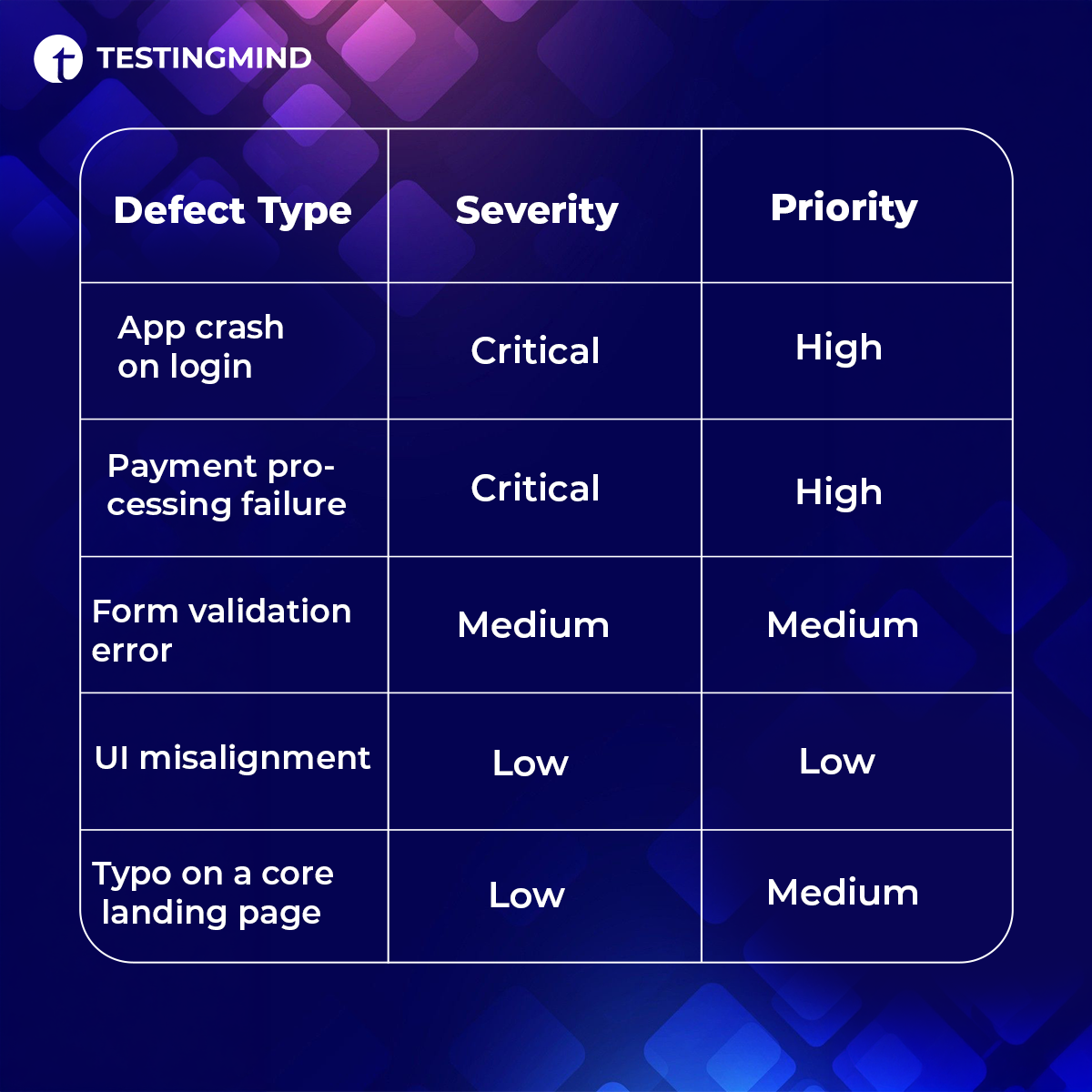
Not all defects deserve the same urgency. A broken checkout flow on mobile is not the same problem as a misaligned icon in a settings menu. A good defect tracking system forces teams to be explicit about both dimensions:
- Severity — how serious is the impact on the system or user?
- Priority — how urgently should it be fixed relative to everything else?
These two fields can and do diverge. A cosmetic bug on a high-traffic marketing page might be low severity but medium priority. A backend edge case might be high severity but deprioritized because it affects a fraction of users.
When these classifications are tracked consistently, triage gets faster and teams stop burning sprint capacity on the wrong things.
4. Clear Ownership and Assignment
Ambiguous ownership is how bugs stay open for weeks without anyone noticing. “Engineering” is not an assignee. A named individual — or a specific, accountable team — is.
Your defect tracking system should make assignment explicit and visible: assigned-to fields that require a specific owner, due dates or SLA tracking where relevant, notifications when a defect is assigned or updated, and a clear history of who changed what and when.
When ownership is clear, defects move. When it’s diffuse, they stall.
5. Collaboration Without Context-Switching
Fixing a defect usually involves multiple roles: QA finds it, engineering fixes it, product decides if and when it matters, support may have customer context. All of that conversation should live in the defect record — not scattered across Slack threads and email chains.
Look for inline comments, @mentions, activity history, attachment support, and shared dashboards. When someone picks up a defect a week after it was logged, they should be able to read the full story without tracking anyone down.
6. Integration With Your Existing Stack
A defect tracking system that lives in isolation creates manual handoffs. Teams end up copy-pasting bug details between tools, losing synchronization, and creating update lag that makes everyone’s data unreliable.
Common integration needs include:
- Version control (GitHub, GitLab, Bitbucket) — linking commits or pull requests to specific defects
- Project management (Jira, Linear, Asana) — syncing defects with sprint or backlog work
- CI/CD pipelines — triggering defect creation from failed builds or updating status post-deployment
- Communication tools (Slack, Teams) — status-change notifications without requiring a login
- Test management platforms — linking test cases to defects for full traceability
The deeper the integration, the less time teams spend on administrative updates.
7. Reporting That Surfaces Patterns, Not Just Counts
A defect tracker that only tells you how many bugs are open is leaving most of its value untouched.
The reporting layer is where a defect tracking system shifts from a reactive operational tool to a proactive quality management platform. Look for:
- Defect aging — how long has each issue been open?
- Resolution time by severity — are critical bugs actually getting resolved faster?
- Reopened defect rate — how often are “fixed” defects coming back?
- Defect density by module — which areas of the product generate the most issues?
- Recurring defects — are the same classes of bugs appearing across releases?
- Release readiness — how many open defects, by severity, are affecting the next release?
These metrics tell QA leads and engineering managers where the process is breaking down — and which parts of the product need architectural attention, not just more bug fixes.
8. Usability That Drives Adoption
This is consistently underweighted in tool evaluations, and it’s one of the most consequential factors.
A defect tracking system is only as valuable as the quality of the data inside it. If the tool is clunky or time-consuming, testers will log minimal information — or skip logging altogether. Developers will update statuses inconsistently. Managers will stop trusting the dashboards.
Ease of use means: fast bug creation, clean search and filtering, sensible default views, and a low time-to-productive for new users. If your QA team needs more than a day of onboarding to use core features, that’s a signal worth taking seriously.
9. Scalability as a First-Class Concern
A tool that works well for five people may struggle under fifty — not because of raw performance, but because it wasn’t built for the organizational complexity that comes with scale.
Think ahead when evaluating:
- Can it support multiple concurrent projects or product lines?
- Does it handle complex permission structures at the team, project, and role level?
- Can different teams within the same organization use different workflows?
- Does reporting aggregate meaningfully across projects?
The cost of migrating a team mid-stride — retraining, historical data migration, process disruption — is high enough that choosing only for current scale is a mistake worth avoiding.
10. Security, Access Controls, and Audit History
For teams in regulated environments, or those handling sensitive customer or financial data, security is a primary requirement.
Minimum expectations: role-based access control, detailed audit logs, encrypted data storage, and SSO support. For healthcare, finance, or government contexts, compliance certifications and data residency options may also apply.
Even outside regulated industries, audit history matters operationally. Tracing every status change, comment, and reassignment across a defect’s full history is essential for post-mortems and process improvement work.
A Practical Evaluation Checklist
Before committing to any platform, run it through these questions:
| Evaluation Area | Questions to Ask |
| Workflow fit | Does this support our actual defect lifecycle, not an idealized version of it? |
| Ease of use | Can QA and developers use core features without heavy onboarding? |
| Reporting | Can it surface defect trends, resolution patterns, and release readiness? |
| Integrations | Does it connect with our version control, CI/CD, and project management tools? |
| Collaboration | Does defect context live in one place, or will it scatter across tools? |
| Customization | Can we configure fields, statuses, and workflows for our process? |
| Scalability | Will this still work when our team or project count grows significantly? |
| Security | Does it offer permissions, audit logs, and appropriate access controls? |
| Cost | Does the pricing model hold up across our expected team size and usage? |
One practical recommendation: run shortlisted tools through a real scenario before deciding. Use your actual defect types, set up your real workflow, and have the people who’ll use it daily run through the core actions. What surfaces in thirty minutes of real use rarely appears in a feature comparison matrix.
Common Mistakes to Avoid
Choosing based on brand recognition instead of fit. Popular tools are popular for a reason, but that reason may be a different team size, workflow type, or use case than yours.
Underestimating adoption risk. A tool your team won’t use consistently is worse than a simpler tool they will. Buy-in from the people using it daily matters as much as the feature set.
Overengineering the workflow upfront. More statuses and required fields don’t produce better tracking — they produce more friction and lower adoption.
Skipping integration evaluation. If your defect tracking system isn’t connected to where developers and testers already work, expect manual overhead and synchronization failures.
Treating reporting as optional. Defect data without analysis is just storage. The reporting layer is where the operational value actually lives.
Final Thoughts
Choosing a defect tracking system is a quality strategy decision, not just a software procurement task.
The right system shortens the gap between “a defect was found” and “a defect is resolved and verified.” It gives every stakeholder the visibility they need without requiring them to chase status updates. And over time, it generates the historical data that helps teams stop fighting the same bugs across every release.
Start with your workflow. Map your actual defect lifecycle, identify where breakdowns happen today, and evaluate tools against those specific pain points. Prioritize fit over features, adoption over sophistication, and long-term scalability over short-term convenience.
The best defect tracking system isn’t the one with the longest feature list. It’s the one your team uses well, every day.
Frequently Asked Questions
What are defect tracking systems?
Defect tracking systems are software platforms used by QA, development, and product teams to log, assign, prioritize, monitor, and resolve software defects throughout the development lifecycle. They provide a centralized, structured record of every reported issue from discovery through closure.
What is the difference between severity and priority in defect tracking?
Severity describes how serious a defect’s impact is on the system or user. Priority describes how urgently it should be fixed relative to other work. The two can diverge — a low-severity bug on a high-visibility page may carry medium priority, while a high-severity edge case may be deferred. Both should be tracked as independent fields.
What is the difference between bug tracking and defect tracking?
Bug tracking typically focuses on identifying and resolving discrete software bugs. Defect tracking is a broader QA term that covers the full lifecycle: detection, triage, assignment, retesting, closure, and trend analysis. In practice, many teams use the terms interchangeably, though defect tracking implies a more structured process.
What features should a defect tracking system include?
Core features: structured defect logging with reproduction steps and environment context, customizable workflows, severity and priority classification, clear ownership and assignment, collaboration tools, integrations with development and testing platforms, reporting and analytics, and role-based access controls with full audit history.
How do I evaluate which defect tracking system is right for my team?
Map your current defect lifecycle first. Then assess tools based on workflow fit, ease of use, integration requirements, reporting depth, scalability, security, and cost. Run shortlisted tools through real scenarios — not vendor demos — and involve the QA and engineering staff who will use them daily.
Why do defect tracking systems matter for software quality?
Without structured defect tracking, teams face duplicate reports, unclear ownership, poor prioritization, and limited visibility into recurring issues. A good system reduces time-to-resolution, improves release quality, and generates trend data that helps teams prevent defect patterns rather than just react to them.